

A customer calls about a case listed on your website. The picture shows an open case with dividers. The description gives a length but never says whether someone measured the inside or the outside. Your stock screen says one is available. The person at the counter thinks it was set aside yesterday. The customer has two reasonable questions: “Will it fit?” and “Do you have one?” Your website ought to answer both. Airgun retail ecommerce brings familiar counter conversations like this onto pages that need to make sense even when the shop is closed.
Start with a small part of your online airgun store that you can check from shelf to screen. A case, a cleaning cloth and a notebook are enough to reveal how your team handles specifications, stock, checkout messages and customer questions. Follow one item from its product listing through a test order. At each step, compare what the customer sees with what the person responsible for that order can confirm.
Give your airgun retail ecommerce project a working brief
Write down who shops with you, what they already know and what regularly sends them to the phone. A returning customer looking for a particular size has a different problem from someone comparing two unfamiliar cases. One needs a reliable search result. The other needs measurements taken the same way. Put an example of each task in the brief so a designer or developer can see what a successful visit looks like.
Next, name the people who can answer questions about the shelf, the website and the customer’s order. In a small shop, those jobs may belong to the same person. The distinction still matters. Someone correcting a product photograph needs different access from someone reviewing a refund. Write down who covers each job when the usual person is away and where their backup can find the relevant record.
Choose what belongs in the first release
For your first airgun retail ecommerce release, choose a collection with reliable records and products your staff recognize. Set aside anything with conflicting model numbers or unclear package contents. Give each item on hold an owner and a question they can answer. “Find a better description” is hard to finish. “Check whether the shoulder strap shown in the photo comes in this package” tells a colleague exactly what to look for.
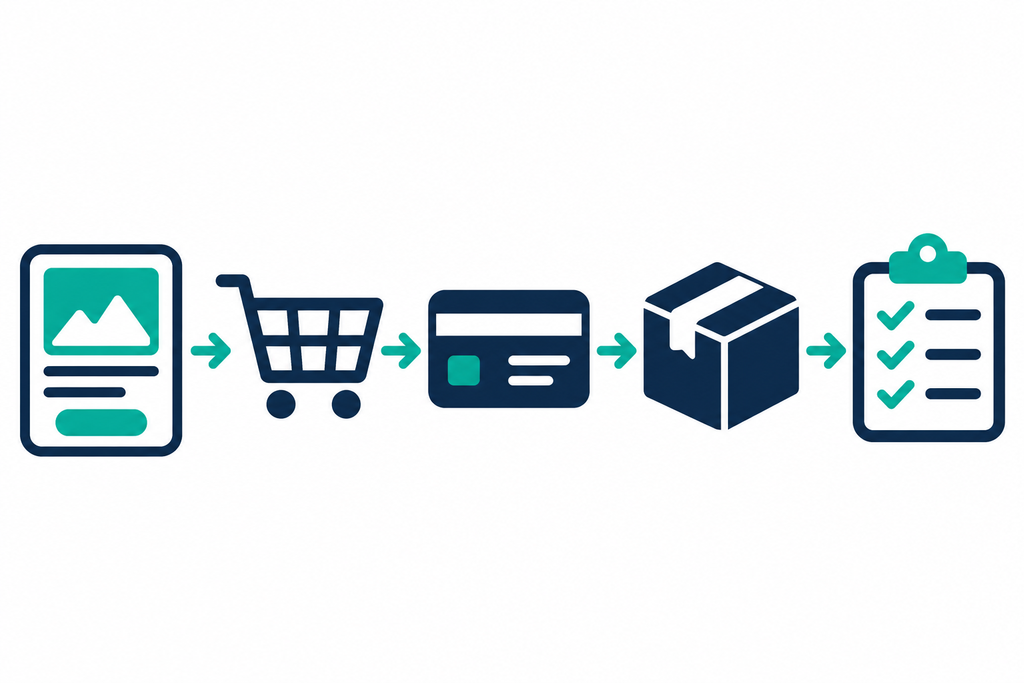
Organize an online airgun store around customer questions
Use the words you hear at the counter to shape your airgun retail ecommerce navigation. If customers ask for “cases” and your menu says “transport solutions,” try the familiar word. Then open the category on a phone and read the product names before looking at the pictures. If several names look identical because the size disappears offscreen, move the size earlier. Keep the full manufacturer reference on the product page for anyone looking up a specific item.
Think about the decisions a customer can make on a collection page. Someone comparing notebooks might want to distinguish lined pages from blank ones before opening a listing. A shopper comparing cases may care about interior dimensions and whether the dividers move. Choose fields that genuinely separate the options. Try each filter yourself. If selecting an option leaves every product visible, that filter takes up space without helping the shopper decide.
Give customers a way back from an empty search
Try a common abbreviation, a discontinued item name and a search that genuinely has no match. Read the empty result as a customer. Can you clear the search without losing your place? Can you reach the right department? If staff know why an old item name keeps turning up, give them a place to record it. The person answering the phone may know exactly which shelf a customer means, even when the website returns nothing.
Build a product record someone else can maintain
To build your airgun retail ecommerce catalog, start with a sample item, its packaging and the manufacturer’s current specification sheet.. Record the model reference as printed, your own stock code, the selling unit and the source for each important specification. Distinguish a measurement supplied by the maker from one taken in the shop. If staff measure an accessory themselves, record where they measured and whether packaging was included. “Interior length with dividers removed” answers a question that “length” leaves open.
For a practical airgun retail ecommerce example, look at the Pelican 1200 Protector Case specifications. Pelican lists the interior dimensions and breaks out the lid depth and bottom depth. That distinction matters to a shopper trying to work out whether an item will fit. Use equally clear labels on your own product page, and check the exact model before copying a measurement.
Photography deserves its own place in an airgun retail ecommerce brief. Put the item you actually sell beside the reference image. Look for a different closure, a removable insert or an accessory sitting in the background. A sharp photograph can still cause a return if it shows a different package. For a repeatable field layout and a worked example, use our product catalog and stock-count guide.
Choose an airgun retailer website your team can operate
Give each prospective provider a task from a normal afternoon at your store. Ask the employee who will use the system to correct an accessory dimension, find the updated record and show where customers will see the change. Watch for steps that require an administrator or a support ticket. Record those alongside the result. A useful airgun retail ecommerce demonstration shows what your staff can finish on their own and where they will need help.
Ask what happens when you need your information back. When comparing airgun retail ecommerce platforms, request a sample catalog export and open it in the spreadsheet your staff actually uses. The WooCommerce product CSV import and export guide explains how the built-in tool works and gives you a reference for checking the sample file. Can you identify the product family, each size, the original stock code and the corresponding photograph? Make a note of any field you have to reconstruct. Use the same platform comparison questions and demo tasks with each provider so you can compare their answers.
Decide what should carry over from the old store
Make a short inventory of the things customers already depend on. Include familiar product references, bookmarked service pages and documents linked from customer emails. A page can look dated and still answer a valuable question. Ask the colleague who handles service calls which pages they send to customers and why. The 2A Commerce migration and plugin FAQs can help you prepare questions about which parts of your existing setup are included in a move.
Give checkout messages the same care as product descriptions
Use an approved test environment and a neutral accessory to walk through checkout. Read each message as if you cannot see the store’s back office. If the screen says an order was received, does the email say the same thing? If a test payment fails, can the shopper find the explanation on a phone? Pay attention to the customer who closes the browser and later has only the email to go on. Can they find their order reference and a way to reach you?
Keep the payment provider’s public policy and your own account terms together. The public page gives you a starting point for a question about your catalog. Keep the written response tied to your business and the version of the catalog you presented. See [OUTBOUND LINK: current acceptable-use policy of the shop’s contracted payment provider]. [verify: policy version and written scope applicable to the merchant.] Our guide to reviewing online payment terms and order messages explains what to bring to that conversation.
Make stock availability mean the same thing at the counter and online
Imagine a customer leaves an accessory at the counter while deciding whether to buy it. Another customer views the same item online. Your team needs a shared answer about whether that unit is still available. Write down how the shop handles an item on hold, a display sample, a damaged unit and a return awaiting inspection. Agree on what each state means before asking a developer to reproduce it on the website.
Walk through the storage area with the person who packs orders. Compare the shelf label with the line that appears on the packing note. If a bin contains similar pouches, put the distinguishing detail where the picker can see it. Make one mock pick from an accessory order. When a colleague has to stop and ask which pouch to take, write down the missing detail and correct it in the product record. Then print the note again to see whether the correction carried through.
Practice a stock correction before you need one
Suppose the website says a case is available, but the only unit on the shelf has a broken latch. Put it aside, record the reason and have the designated person correct the available quantity. Check the product page in a fresh session. Then look for any open order awaiting that item. Updating the listing protects the next shopper from seeing an inaccurate count. Someone still needs to contact the customer whose existing order is affected.
Put an owner behind each public promise
Start an airgun retail ecommerce content review by reading your delivery, returns and contact pages together. Circle statements that someone at the shop must carry out. If customers are told they will receive a reply, identify the inbox and the person covering it. If they are asked to include an order reference, make sure it is easy to find in their confirmation. Only put a turnaround time in public copy once the owner has approved it and the people doing the work can support it.
Give questions about destinations and product rules a named reviewer. Airgun requirements can differ by state and locality. Have a qualified professional review statements about where the store can sell before they appear on a page or in a saved customer-service reply. Our guide to reviewing customer-facing sales policies gives editors a way to track those questions. This article covers store operations. Obtain qualified advice for legal, tax and shipping-compliance decisions.
Rehearse a day at the store before launch
For your airgun retail ecommerce launch rehearsal, have the employee who normally handles orders sign in with their usual staff account and work through a fictional order. Start at a category page, choose an accessory and follow the order through confirmation. Give a colleague the order reference and ask them to find the record using the access they will have on a busy day. Then change one condition, such as an accessory coming back for inspection. Check the customer message, internal note and stock status separately.
- Ask a colleague to find the selling unit and package contents on a phone.
- Compare the chosen size or variation with the item on the mock packing note.
- Read the order email aloud. Identify what the customer knows and what they should do next.
- Check who can correct a factual mistake and who approves the public change.
- Give each failed check an owner, an example and a clear way to tell when it is fixed.
Save enough detail for another person to repeat the test. “Checkout looks wrong” leaves a developer guessing. “I selected the small case, but the confirmation email says large” identifies the selection, the wrong result and the place to check. Attach a screenshot showing the relevant option and message. After the correction, ask the original tester to repeat the same order and compare the email with the packing note.

Use support questions to improve airgun retail ecommerce
After launch, ask the person answering messages to keep the customer’s wording when recording a recurring question. “What does it come with?” tells you more about the missing information than a ticket labeled “product issue.” Link the question to the page the customer saw and write down the answer staff gave. Several different questions may point to the same missing photograph, field label or sentence near the size selector.
Choose an improvement you can observe. If staff clarify the inside length of a case, check whether the description, comparison view and customer-service reply now use the same label. If people still ask, look at the mobile layout before writing a longer answer. The information may already exist below a collapsed section that shoppers rarely notice. Improving airgun retail ecommerce can be as simple as moving one reliable measurement next to the size choice it helps a customer make.
Questions from shop owners
What should a small team finish first?
For a small airgun retail ecommerce team, finish a collection you can maintain and rehearse the work behind it. A clear product page, a stock count someone owns and an inbox someone reads are a practical starting point. If the test exposes a routine task only the owner can finish, decide who will cover it when the owner is away before adding another collection.
How do I know whether a redesign has improved the store?
Hand a colleague the same customer question you used to test the old site. Watch them find the answer on the new one. Record where they hesitate and whether the answer they find is accurate. Return to the storage case from the opening example. Can the customer now tell whether their item will fit and whether a case is available? Those are improvements you can demonstrate to the people who used to answer the call.
Which documents should I keep once the store is running?
Keep three airgun retail ecommerce records where staff can find them: the editable product catalog, the policies customers see and the team’s notes on unusual orders. Give each document an owner and a location colleagues can find. When the shop changes a process, update the customer message and the staff instructions in the same review. The next employee who picks up the phone should be able to give the same answer the customer just read on your website.